Choose an activity together. Keep the follow-up clear.
Discuss needs and options, shape the question and follow an accepted next step. Adult participants keep the decision, reasons and progress in one place.
Available on the web and iOS. Android is currently being tested; a public Google Play release is not yet promised.
What does Deferendum actually do?
Choosing an activity, organizing adult volunteers and following up after a meeting can scatter the discussion across many messages. Deferendum gives the group a shared path to assess a concern, clarify the question and examine arguments before voting. After an adopted ordinary decision, one next step and accepted responsibility make the follow-up visible. Adults participate for themselves.
How does Deferendum help a parent-teacher association?
Deferendum helps adult participants discuss a need, shape the question, compare arguments and vote under group rules. After an adopted ordinary decision, it keeps the next step, accepted responsibility and progress connected. It does not replace school approvals.
How can a PTA decision continue after a meeting?
After an ordinary decision passes, the Administrator describes one step and selects an active responsible member. The person accepts or declines; after accepting, they post updates. Another active member confirms completion or says more work remains.
Recognize the situation?
Which activity should we support?
Start with the need the activity would address. The group can explore a workshop within available resources and discuss the reasons. Checking those resources can become the next step, without collecting money in the app.
For an event, a decision can continue with one step to coordinate the space. The Administrator selects an active responsible member, who accepts or declines. Deferendum follows that step; it does not promise a volunteer-shift scheduling system.
Keep the question and reasons beside the result. The person who accepts posts updates, and another active member confirms completion or says more work remains. The context stays available after the meeting.
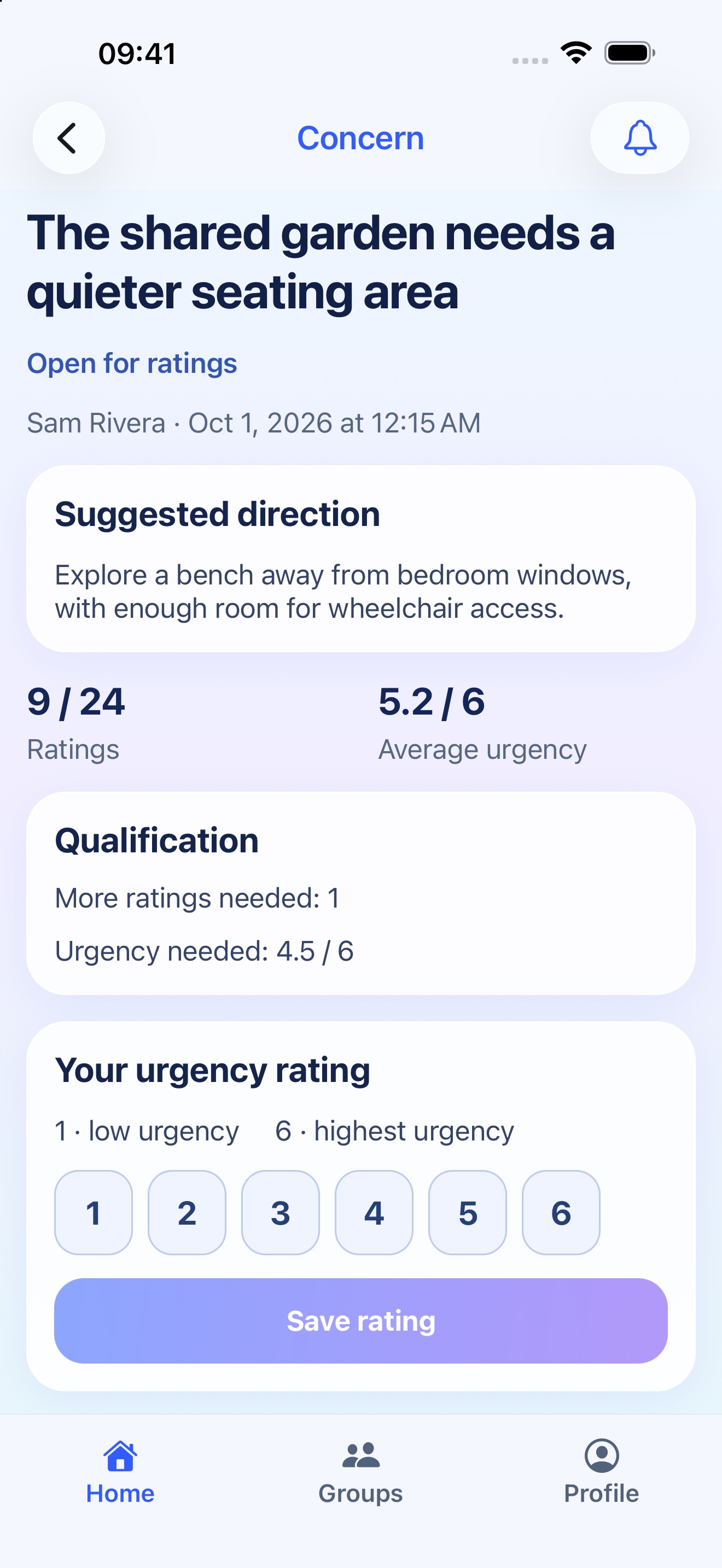
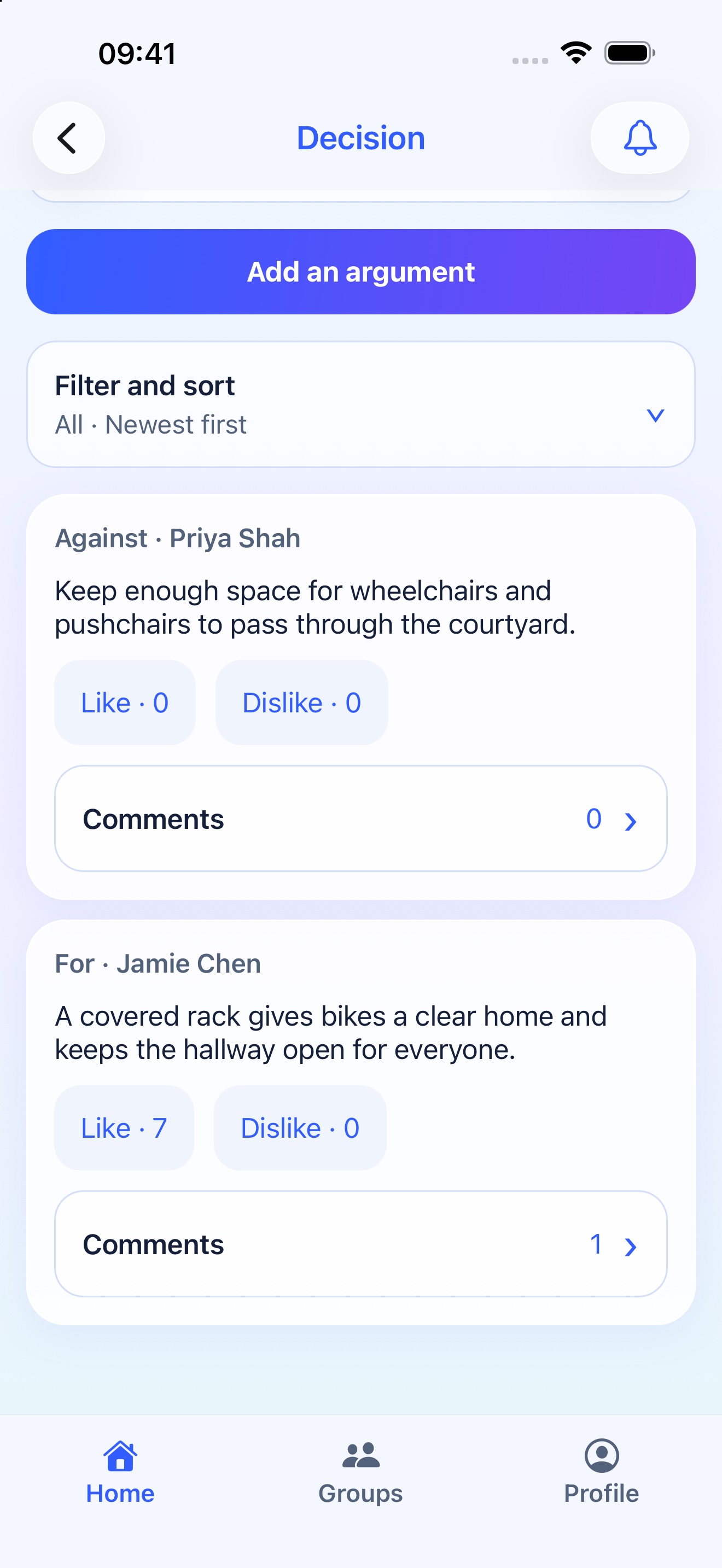
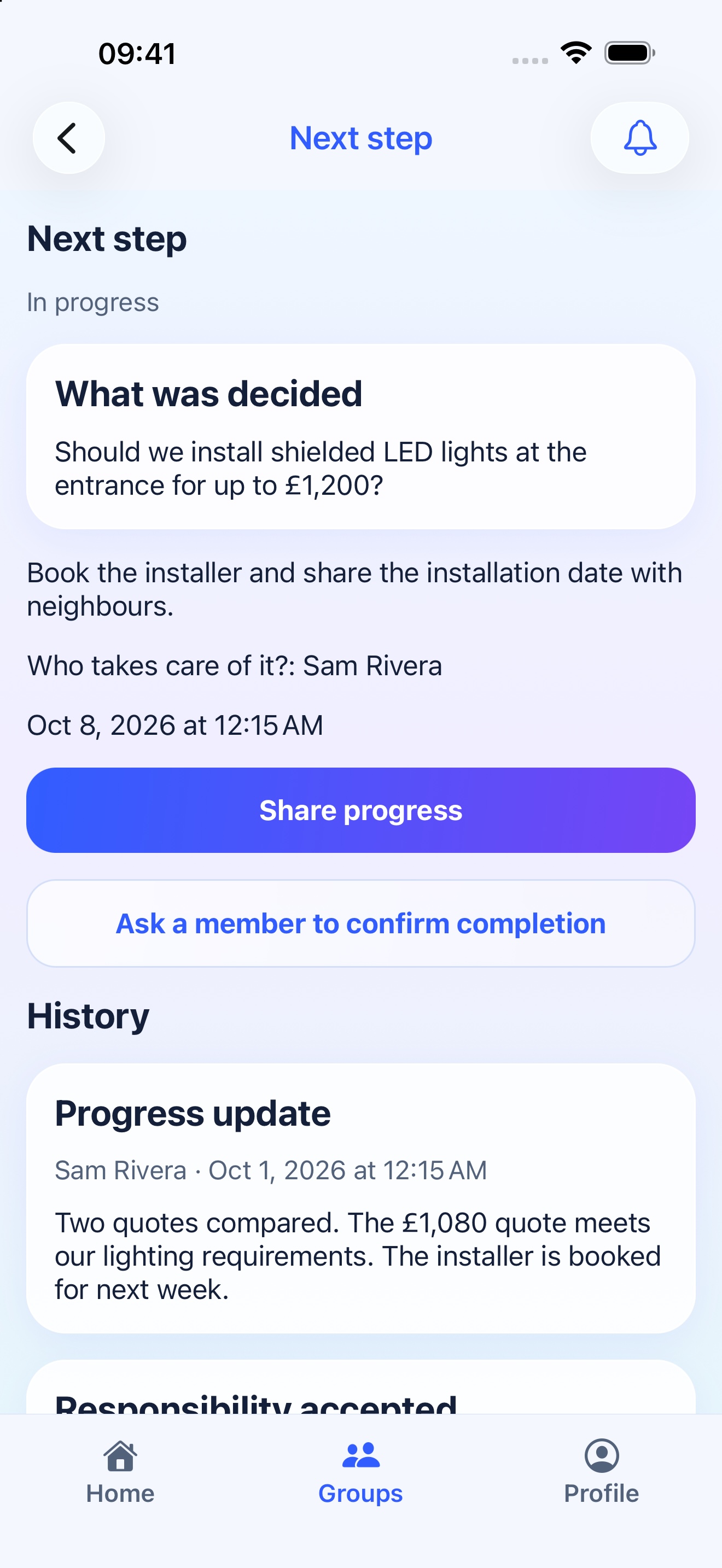
Actual iOS screens in English, using fictional demonstration data. The screenshots show the product, not a customer story.
Rate a concernCompare argumentsFollow the next step
From a concern to a clear next step
Describe a concrete concern
A member explains what is happening and who it affects. Others assess urgency. Start with the need without assuming the first proposed solution is already the group’s choice.
Let the group’s rules determine progression
A concern enters collective wording only if it meets the group’s conditions, under its chosen cadence. The Administrator cannot promote it unilaterally. Not every concern will advance.
Shape the question together
Members can propose wording and support versions they find clear. When framing closes, the leading eligible version becomes the debate question under the group’s rules.
Compare reasons before voting
Arguments for and against, along with comments, stay linked to the question. Discussion can refine the wording; the version history lets members follow what changed.
Eligible members vote
When voting opens, the eligible list and applicable rules are fixed. A confirmed choice cannot be changed. Participation, thresholds and group rules determine the result; ballot privacy depends on the settings.
Give an adopted decision one next step
After an adopted ordinary decision, the Administrator describes one step, selects an active responsible member and may add a deadline. The person accepts or declines; after accepting, they post updates and request confirmation.
Confirm completion and keep the context
Another active member confirms completion or says more work remains. The result, rules, history and progress stay connected. The community does the work; the app organizes the follow-through.
Invite only participants aged 18 and over, using their own accounts.
Choose an activity or step the group can coordinate; check any required approvals separately.
Discuss options and organization without children’s personal information, images or identifiable situations.
Questions before you start
Can children or school pupils participate?
Not in the current launch. Deferendum is for people aged 18 and over. This scenario involves parents, teachers and other eligible adult group members participating for themselves. Avoid posting children’s personal information, photographs or identifiable situations in concerns or comments.
Does a group decision automatically authorize a school activity?
No. The group can use Deferendum for consultation and next-step coordination. School permissions, association rules and any required approvals or records must be handled separately. Participation in the app does not automatically give authority over an activity or other families.
Can we collect funds or schedule volunteer shifts?
The scenario helps discuss an activity and follow one accepted next step. Deferendum does not collect funds and should not be presented as a complete donation, event-registration or shift-scheduling system. Use the appropriate separate tools for those operations.
How do I sign up from this page?
Start with your email and complete your name, password and adult/legal acceptance here. After submitting the form, open the real confirmation message and confirm your address. Entering an email alone does not activate an account or automatically join a group.
Who can participate in a group?
Deferendum is for people aged 18 and over. Everyone participates from their own account. An invitation becomes membership only after acceptance; the Administrator cannot vote or comment for the invited person. Email confirmation does not automatically verify a legal membership or property right.
Does every concern reach a vote?
No. Members assess urgency, and group rules determine qualification and when a concern advances. Wording and debate come before the vote. A concern may not qualify, a proposal may not pass and an action may remain unfinished.
Are votes always anonymous?
Do not assume they are. Visibility depends on the process rules and settings: a ballot may be confidential with aggregate results or transparent under the applicable mode. Check the displayed rules before confirming. A confirmed choice cannot be edited or withdrawn.
What happens after a decision passes?
For an adopted ordinary decision, the Administrator defines one step, selects an active responsible member and may add a deadline. The person accepts or declines. After accepting, they share progress and request completion confirmation. Another active member confirms or says more work remains.
Start your community’s next conversation
Enter your email here. Then choose your account details and confirm your email. The suggested group type is a starting point, not a group created automatically.
We use cookies on our website to give you the most relevant experience by remembering your preferences and repeat visits. By clicking “Accept”, you consent to the use of ALL the cookies.
This website uses cookies to improve your experience while you navigate through the website. Out of these, the cookies that are categorized as necessary are stored on your browser as they are essential for the working of basic functionalities of the website. We also use third-party cookies that help us analyze and understand how you use this website. These cookies will be stored in your browser only with your consent. You also have the option to opt-out of these cookies. But opting out of some of these cookies may affect your browsing experience.
Necessary cookies are absolutely essential for the website to function properly. These cookies ensure basic functionalities and security features of the website, anonymously.
Cookie
Duration
Description
cookielawinfo-checkbox-advertisement
1 year
Set by the GDPR Cookie Consent plugin, this cookie records the user consent for the cookies in the "Advertisement" category.
cookielawinfo-checkbox-analytics
11 months
This cookie is set by GDPR Cookie Consent plugin. The cookie is used to store the user consent for the cookies in the category "Analytics".
cookielawinfo-checkbox-functional
11 months
The cookie is set by GDPR cookie consent to record the user consent for the cookies in the category "Functional".
cookielawinfo-checkbox-necessary
11 months
This cookie is set by GDPR Cookie Consent plugin. The cookies is used to store the user consent for the cookies in the category "Necessary".
cookielawinfo-checkbox-others
11 months
This cookie is set by GDPR Cookie Consent plugin. The cookie is used to store the user consent for the cookies in the category "Other.
cookielawinfo-checkbox-performance
11 months
This cookie is set by GDPR Cookie Consent plugin. The cookie is used to store the user consent for the cookies in the category "Performance".
CookieLawInfoConsent
1 year
CookieYes sets this cookie to record the default button state of the corresponding category and the status of CCPA. It works only in coordination with the primary cookie.
PHPSESSID
session
This cookie is native to PHP applications. The cookie stores and identifies a user's unique session ID to manage user sessions on the website. The cookie is a session cookie and will be deleted when all the browser windows are closed.
viewed_cookie_policy
11 months
The cookie is set by the GDPR Cookie Consent plugin and is used to store whether or not user has consented to the use of cookies. It does not store any personal data.
Functional cookies help to perform certain functionalities like sharing the content of the website on social media platforms, collect feedbacks, and other third-party features.
Cookie
Duration
Description
_vis_opt_s
3 months 8 days
Visual Website Optimizer sets this cookie to detect if there are new to or returning to a particular test.
_vis_opt_test_cookie
session
Visual Website Optimizer creates this cookie to determine whether or not cookies are enabled on the user's browser.
Performance cookies are used to understand and analyze the key performance indexes of the website which helps in delivering a better user experience for the visitors.
Cookie
Duration
Description
_vwo_ds
3 months
This cookie stores persistent user-level data for VWO Insights.
_vwo_sn
1 hour
This cookie stores session-level information.
_vwo_uuid
1 year 1 month 4 days
Visual Website Optimizer sets this cookie to generate a unique id for every visitor and for its report segmentation feature. The cookie also allows to view data in a more refined manner.
Analytical cookies are used to understand how visitors interact with the website. These cookies help provide information on metrics the number of visitors, bounce rate, traffic source, etc.
Cookie
Duration
Description
_fbp
3 months
Facebook sets this cookie to display advertisements when either on Facebook or on a digital platform powered by Facebook advertising after visiting the website.
_ga
1 year 1 month 4 days
Google Analytics sets this cookie to calculate visitor, session and campaign data and track site usage for the site's analytics report. The cookie stores information anonymously and assigns a randomly generated number to recognise unique visitors.
_ga_*
1 year 1 month 4 days
Google Analytics sets this cookie to store and count page views.
_vwo_uuid_v2
1 year
This cookie is set by Visual Website Optimiser and calculates unique traffic on a website.
Advertisement cookies are used to provide visitors with relevant ads and marketing campaigns. These cookies track visitors across websites and collect information to provide customized ads.
Cookie
Duration
Description
_ir
session
This is a Pinterest cookie that collects information on visitor behaviour on multiple websites. This information is used on the website, in order to optimize the relevance of advertisement.
fr
3 months
Facebook sets this cookie to show relevant advertisements by tracking user behaviour across the web, on sites with Facebook pixel or Facebook social plugin.